23.4 Advanced Unit Settings
Advanced... on a unit's properties opens settings most units don't need: for partitioned data, padded keys, compound keys, dates stored as text, and how values are loaded. Changes apply right away; Close closes the dialog.
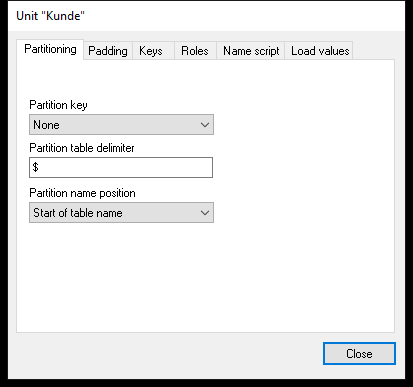 The Advanced dialog for the unit Kunde (Customer).
The Tabs
| Tab | Settings |
|---|---|
| Partitioning | For data split into one table per partition, e.g. per company: Partition key None / Logical / Physical, the Partition table delimiter (default $) and the Partition name position (start or end of the table name, or database/schema) |
| Padding | Adds characters to values users type, e.g. leading zeros so 12 becomes 00012: Use padding string, String, position Left or Right, with a preview |
| Keys | Relationship to the child: One to many (default), One to one or Many to many; Dependent; a compound key – another unit that, together with this one, identifies a value; and Partial (default – values without a match are kept, outer join) or Complete (only matching values, inner join) |
| Roles | What the unit represents – Time, Year, Quarter, Month, Week, Date, Email, Weekday. For dates stored as numbers or text, the Date mask:, e.g. yyyymmdd, lets Datashop treat the values as dates in filters. |
| Name script | SQL that returns the unit's name, for data-driven names; Update now runs it |
| Load values | Whether Datashop loads the unit's values for searching and filter lists: Automatic (default), Always or Never, optionally with a Custom script... |
Things Set Elsewhere
- Row-level security – which values each user may see – is a filter on the user, set in Enterprise Manager (user properties, Filter tab).
- Consolidations, segmentations and histograms are created in Datashop Expert – see Chapter 15 and Chapter 14. Modeller shows them under their dimension.
- There's no calendar generator: date units come from a date table in your data warehouse.