9.3 Dynamic Dates
A dynamic date is a date that moves with time: today, January 1st this year, the last day of last month. Use them instead of fixed dates, and a workbook opened next month shows next month's figures – no editing needed. Typical uses: a year-to-date filter, or a report always covering last month.
Where You Can Use Them
- In any filter condition on a date dimension: choose the value type Dynamic Date – see 9.2 Building Filters.
- As default values in date filter boxes and date filter visuals.
- In filter modifiers, e.g. same period last year – see 9.4 Filter Modifiers and Ignoring Filters.
The Dynamic Date Editor
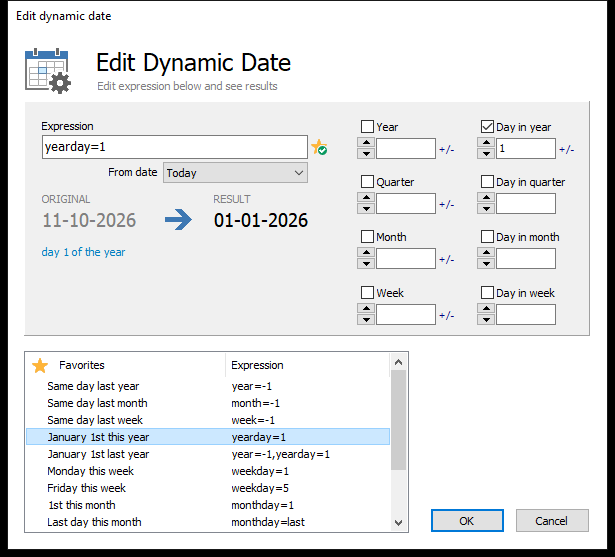 Building "January 1st this year": the expression yearday=1, the original date, the result and a description in words.
| Part | What it does |
|---|---|
| Expression | The dynamic date in text form. The star button adds it to the favorites. |
| From date | What to count from: Today, or the current filter's values {Value1} / {Value2} (in modifiers) |
| ORIGINAL → RESULT | The starting date and the date the expression gives today, with a description in words |
| Year, Quarter, Month, Week, Day in year, Day in quarter, Day in month, Day in week | Build the expression by ticking parts and entering values. Toggle +/- for relative values (e.g. −1 = one back). |
| Favorites | Ready-made dynamic dates – click one to use it |
Built-in Dynamic Dates
These are available in every project (in the Filters folder under Default filters, where you can also add your own):
| Name | Expression |
|---|---|
| Today | (empty) |
| Yesterday | yearday=-1 |
| Same day last week | week=-1 |
| Same day last month | month=-1 |
| Same day last year | year=-1 |
| Monday this week | weekday=1 |
| Friday this week | weekday=5 |
| 1st this month | monthday=1 |
| Last day this month | monthday=last |
| Last day last month | month=-1,monthday=last |
| 1st next month | monthday=1,month=+1 |
| January 1st this year | yearday=1 |
| January 1st last year | year=-1,yearday=1 |
| Last day this year | yearday=last |
| Last day last year | year=-1,yearday=last |
Year to date is a Between condition from January 1st this year to Today.
Writing Expressions
An expression is a comma-separated list of part=value, worked through from left to right, starting from today. An empty expression means today.
| Part | Absolute value | Relative value (+N / −N) |
|---|---|---|
year |
The year, e.g. year=2025 |
Years ahead/back, e.g. year=-1 |
quarter |
First month of quarter N | Quarters ahead/back |
month |
Month N (1–12) | Months ahead/back |
week |
Week N | Weeks ahead/back |
yearday |
Day N of the year; last = 31 December |
Days ahead/back, e.g. yearday=-1 = yesterday |
quarterday |
Day N of the quarter; last = last day of the quarter |
– |
monthday |
Day N of the month; last = last day; last-1 = the day before the last |
– |
weekday |
1 = Monday … 7 = Sunday, in the same week | – |
from |
Start from another date: a date, {Value1} or {Value2} |
– |
The order matters: month=-1,monthday=last first goes back a month, then to its last day – the last day of last month.
[!NOTE]
week=Ncounts weeks from 1 January, not ISO week numbers.
Related Topics
- 9.2 Building Filters
- 9.4 Filter Modifiers and Ignoring Filters
- 7.7 Configuring the Filter Panel – default values for date filter boxes