3.1 Why Dimensional Models?
When you open Datashop and start building a report, you see business terms like Customer, Sales Order, Item, and Salesperson. You don't see database tables, column names, or cryptic field codes. You drag Date, Customer and Turnover together in a visual, and Datashop instantly knows how to combine them. This isn't magic—it's the power of a dimensional model.

A dimensional model organizes your data around the questions you want to answer: Who bought what, when, where, and how much? It translates the complex structure of your ERP system into a clean, intuitive framework designed for analysis. This chapter explains why dimensional models make Datashop so effective for answering business questions.
The Problem with Database Tables
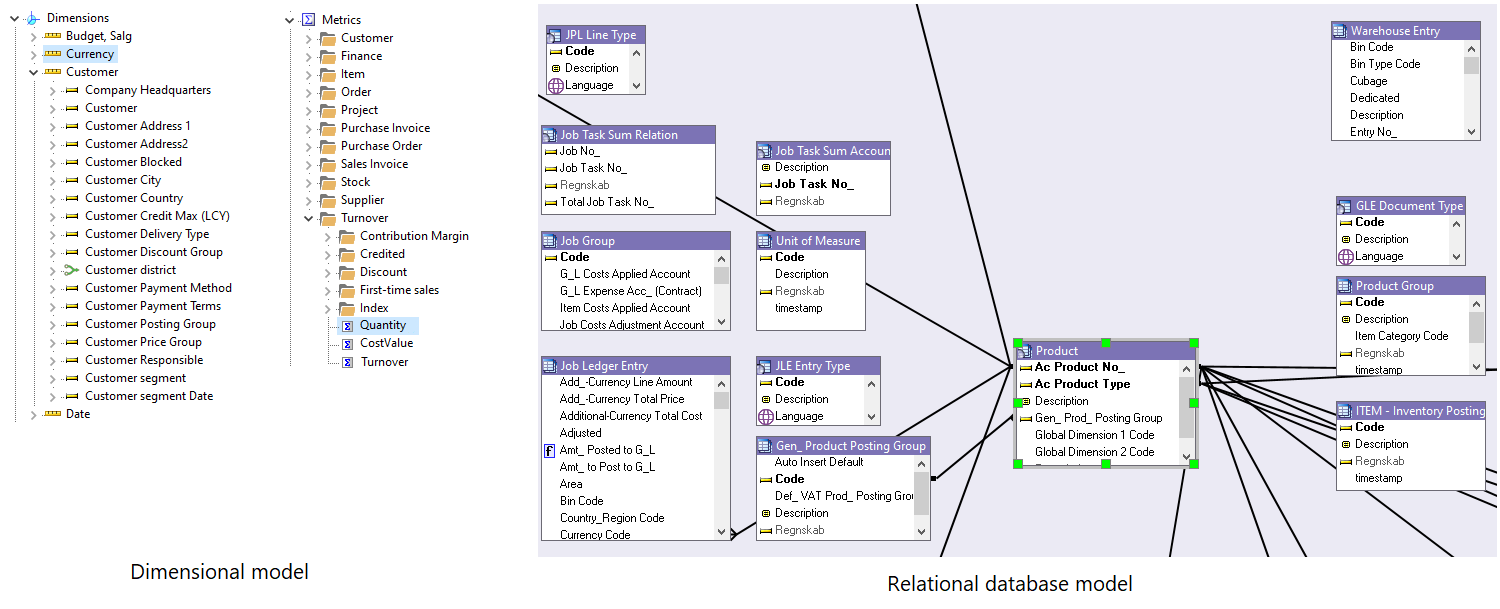
Your ERP system—whether it's Business Central, Uniconta, Visma Business or another platform—stores data in hundreds, or even thousands of tables with names like G/L Entry, Sales Line, or Value Entry. Each table has columns with technical names, relationships defined by foreign keys, and structures optimized for transaction processing, not analysis.
If you tried to build a report directly on these tables, you'd need to: - Know which tables to join and in what order - Understand obscure field names and codes - Handle header/line structures, one-to-many relationships, and data spread across multiple tables - Write complex SQL queries for even simple questions
This approach is fine for IT professionals building custom reports, but it's a barrier for business users who just want to see sales by customer or inventory by location.
What a Dimensional Model Does
A dimensional model sits between you and the database complexity. It reorganizes your ERP data into dimensions (business perspectives like Customer, Date, Product) and metrics (numbers you want to analyze like Turnover, Quantity, Profit).
Think of dimensions as the "lenses" through which you view your business. Each dimension represents a way to slice and group your data: - Customer dimension: Analyze by customer, customer group, region, or city - Date dimension: Break down by year, quarter, month, week, or day - Item dimension: Group by product, category, or supplier - Location dimension: Compare warehouses or sales regions
The dimensional model handles all the technical details—table joins, foreign keys, complex relationships—so you can focus on answering business questions. You think in business terms, and Datashop translates that into the right database queries behind the scenes.
Why Dimensional Models Excel at Analysis
Traditional reports often answer one specific question: "What were sales in Q3?" If you want to change that to "What were sales in Q3 by customer?" you might need a new report. Dimensional models are fundamentally different—they're designed for exploration.
Flexibility: Drag Customer to rows, Date to columns, and Turnover to values. Instantly see sales by customer over time. Want to add Item Group? Just drag it in. Want to filter to a specific region? Apply the filter. The model adapts to your questions.
Consistency: Everyone works from the same definitions. "Turnover" means the same thing in every report. Customer hierarchies are consistent across all analyses. This eliminates the "which report is right?" debates that plague organizations.
Speed: Because the model is optimized for analysis, queries run fast. You can explore data interactively, drilling down from yearly totals to daily details, without waiting for new reports to be built.
From Transactions to Insights
ERP systems are optimized for recording transactions—processing orders, tracking inventory, posting invoices. Dimensional models are optimized for understanding patterns—identifying trends, comparing performance, spotting opportunities.
When you analyze sales in Datashop, you're not looking at individual invoice lines. You're seeing aggregated, summarized data organized around business questions: Which customers are most profitable? How do sales trend over time? Which products drive revenue? The dimensional model transforms transactional details into strategic insights.
You Don't Need to Know the Details
Here's the best part: You don't need to understand how the dimensional model works to use it effectively. You don't need to know which tables are joined or how metrics are calculated. Datashop presents you with business terms, and the model does the rest.
However, understanding the basic concepts—which we'll cover in the next sections—helps you use Datashop more effectively. You'll know where to find the dimensions you need, how to interpret hierarchies, and why certain combinations work seamlessly while others require filters.
The dimensional model is configured and maintained in Acinta's Modeller tool by your IT team or data specialists. Once it's set up, you simply use it—like driving a car without needing to know how the engine works.
Tips – Why Dimensional Models?
- Think in terms of business questions: "Who, what, when, where, how much?" These naturally map to dimensions and metrics.
- The same data that answers "sales by customer" can instantly answer "sales by product" or "sales by region"—that's the power of dimensional flexibility.
- If you're curious about how the model is structured, ask your administrator or check the Modeller documentation, but you don't need that knowledge to be productive in Datashop.
Related Topics
- 3.2 Core Concepts - Understanding dimensions, metrics, and facts
- 3.4 Exploring Your Data Model - How to navigate available dimensions
- 5.1 What is a Workbook - Putting dimensions to work
Next Steps
Now that you understand why dimensional models are so effective for analysis, let's explore the core concepts that make them work: 3.2 Core Concepts