14.4 Top N and Bottom N Rankings
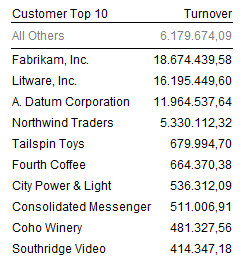
A Top N segmentation highlights the best-performing items in a dimension — for example, your top 10 customers by turnover or your top 5 products by profit.
A Bottom N segmentation works the same way but focuses on the lowest values.
These are the most common segmentation types because they quickly answer the question:
“Who are my top (or weakest) performers?”
How it works
- Create a Top N segmentation (see 14.3 How To Create A Segmentation)
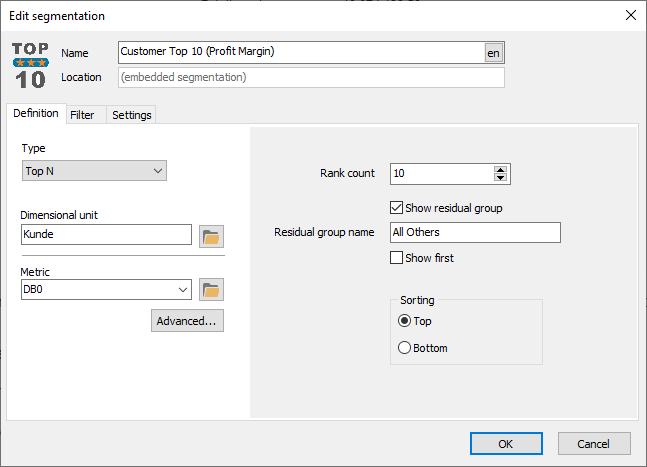
- Select a Metric from the list or by browsing the data model (click button with folder)
- If you know the name of the metric or need to use a metric expression you can just type it directly
- Inspect the default settings and see if you need to change something
Options:
- Rank count: Number of items in the rank segment, e.g. 10
- Show residual group: If checked, a segment will be added that shows the total of all the items that are not part of the ranking segment.
- Residual group name: A custom name for the residual group
- Show first: If you check this box then the residual group is shown before then ranked items. Otherwise it is shown after.
- Sorting: Choose Top for a top ranking, and Bottom for a bottom ranking.
If the suggested name does not suit you then choose another.
Example
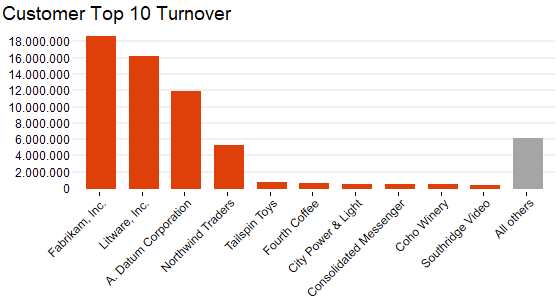
Imagine a bar chart of Turnover by Customer:
- The “Top 10 Customers” segment shows the highest ten bars, clearly separated.
- A second segment “All Others” condenses the rest into one bar, keeping the visual clean and comparable.
This segmentation adapts automatically when filters change — “Top 10 Customers in 2024” instantly becomes “Top 10 Customers in Germany” when you apply a region filter.
Tips – Top N and Bottom N Rankings
- Top N segmentations are true dashboard boosters that reduce the amount of unnecessary and secondary information on the user's screen. Use Segmentations for more appealing dashboards that convey important information faster!
- If space is scarce on your dashboard then consider going for Top 5; The user can always drill-down in the "All Others" group to see the remaining members.
- Use Bottom N analysis based on profits to identify your worst performing customers, vendors, items, and sales persons and strategize how to either improve their performance or at least reduce costs/losses.
Common Issues – Top N and Bottom N Rankings
Problem: Space is often scarce in dashboards.
- Solution: Use Top N segmentations to reduce amount of shown information while maintaining or even increasing focus on the most important data. Teach users that they can double-click the "All Others" segment to see the members in that group.