14.7 Quartiles, Percentiles and other Quantiles
Divide Your Data into Meaningful Groups for Smarter Decisions
Quantile segmentation is a powerful analytical technique that divides your data into equal-sized groups based on rank order. This method allows you to identify patterns, outliers, and meaningful thresholds within your datasets, making it invaluable for customer segmentation, performance analysis, and risk assessment.
Understanding Quartiles and Percentiles
Quartiles divide your data into four equal parts, creating three key splitting points:
- Q1 (25th percentile): The value below which 25% of your data falls
- Q2 (50th percentile/Median): The middle value that splits your data in half
- Q3 (75th percentile): The value below which 75% of your data falls
Percentiles provide more granular segmentation by dividing data into 100 equal parts. Common percentiles include the 90th (top 10% threshold), 95th (top 5% threshold), and 99th (top 1% threshold) percentiles, which are particularly useful for identifying high-value customers or extreme cases.
How To Create a Quantile Segmentation
Create a Quantile segmentation (see 14.3 How To Create A Segmentation):
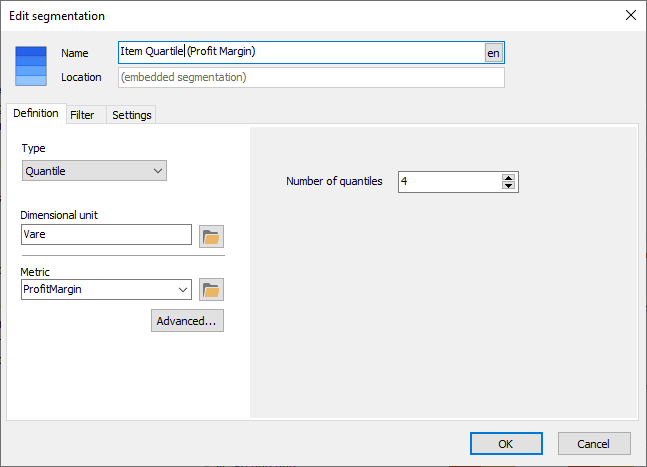
Select the number of quantiles - or segments - in your quantile segmentation. Many quantiles have names, for example 4 segments makes it a Quartile segmentation, 3=Tertile and so on.
Business Applications
Customer Segmentation: A retail company can segment customers by annual spending. The top quartile (Q4) represents your highest-value customers who may deserve premium service, while the bottom quartile (Q1) might benefit from engagement campaigns to increase their spending.
Performance Benchmarking: Sales managers can use quartiles to categorize sales representatives. Those in the top quartile might be recognized as top performers, while those in the bottom quartile may need additional training or support.
Risk Assessment: Financial institutions use percentiles to identify unusual transaction patterns. Transactions above the 95th percentile might trigger fraud alerts, while those below the 5th percentile could indicate processing errors.
Inventory Management: Products in the top quartile by sales velocity require different stocking strategies than those in lower quartiles, helping optimize warehouse space and reduce carrying costs.
Interpreting Results
When reviewing quantile segmentation results in Datashop, remember that each group contains the same number of records, not the same range of values. For example, if you segment 1,000 customers into quartiles by purchase amount, each quartile will contain exactly 250 customers, but the spending range within each quartile may vary significantly. The bottom quartile might span $10 to $50, while the top quartile could range from $500 to $5,000.
Example use
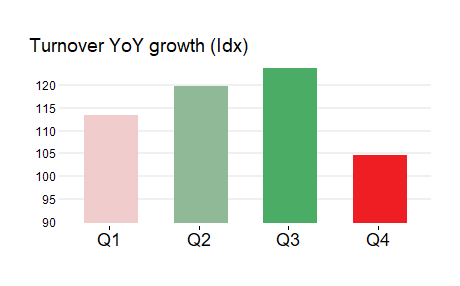
The bar graph shows how the Customer Quartiles grow year-on-year. It's evident that the fastest growing quartile is Q3.
Tips – Quartiles, Percentiles and other Quantiles
- View your Quantiles as an index to last year or index to budget to see which quantile grows the fastest and slowest respectfully.
- Use a color scale or heat map from Conditional Formatting to highlight your quantiles
Common Issues – Quartiles, Percentiles and other Quantiles
Handling Ties and Duplicate Values.
When multiple records share the same value at a quartile boundary, the BI tool must decide how to assign them. This can result in slightly unequal group sizes and quartile assignments that appear inconsistent, particularly in datasets with discrete or rounded numbers.
- Solution: Review the distribution of your data before segmentation. If you have many duplicate values, consider using percentiles instead of quartiles for finer granularity, or create custom segments based on specific business thresholds rather than pure statistical divisions.