1.5 Getting Help & Learning More
Every tool has a learning curve, but Datashop gives you multiple ways to get unstuck fast. Whether you prefer instant AI assistance, comprehensive documentation, or expert human support - you're covered. This section shows you where to turn when you need help.
Meet nikolAI: Your Built-In Assistant
The fastest way to get help in Datashop is often nikolAI - an artificial intelligence assistant that's always available right inside the application.
What Makes nikolAI Special?
Unlike searching online or reading generic documentation, nikolAI:
- Knows your environment - It understands your specific data model, dimensions, metrics, and workbooks
- Speaks your language - Ask questions in plain English, Danish, German, or other languages
- Provides context-aware help - It knows which workbook you're in and can answer questions about what you're looking at
- Builds things for you - Not just answers, but actual visuals, filters, and metrics based on your requests
Opening nikolAI
Look for the nikolAI icon in the status bar at the bottom of your workbook window. Click it to open the assistant panel.
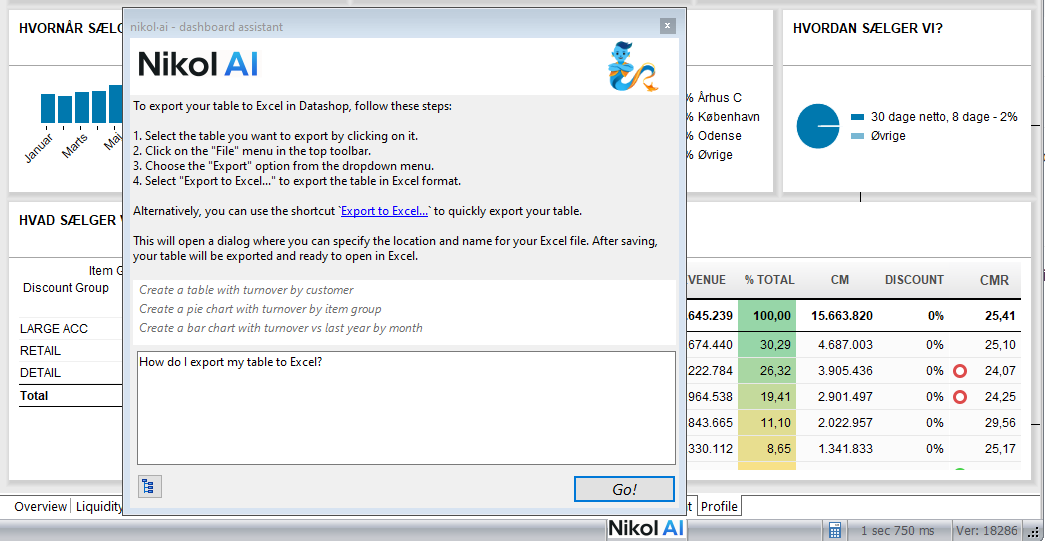
What You Can Ask
nikolAI is versatile - here are just a few examples:
Understanding Concepts: - "What's the difference between a dimension and a metric?" - "Explain how drill-down works" - "What does the Profit Margin metric calculate?"
Getting Oriented: - "What dimensions are available in this data model?" - "What workbooks can I access?" - "Explain what I'm seeing in this dashboard"
Accomplishing Tasks: - "Show me turnover by customer for this quarter" - "How do I filter to see only retail customers?" - "Add a chart comparing this year to last year"
Design & Creation (Expert users): - "Create a table with turnover and profit margin by product" - "Add a year-over-year comparison column to this table" - "Make a bar chart showing top 10 customers by revenue"
💡 Pro Tip: Be Specific
The more detailed your question, the better nikolAI can help. Instead of "make a chart", try "make a bar chart showing monthly turnover for 2024, colored by customer group".
nikolAI Limitations
While powerful, nikolAI isn't perfect: - Complex multi-step requests work better when broken down - It learns from your feedback - if something doesn't work, rephrase and try again - It can't change your permissions or access data you're not authorized for
📘 Learn More
For a complete guide to working with nikolAI, see Chapter 2: nikolAI - Your Intelligent Assistant
This Documentation
You're reading it right now! This comprehensive manual covers everything from basic concepts to advanced techniques.
How to Navigate
By Chapter - Follow the logical progression from basics to advanced topics - Chapters 1-3: Getting started and core concepts - Chapters 4-11: Using and creating workbooks - Chapters 12+: Specialized features and troubleshooting
By Topic - Use the table of contents to jump directly to what you need - Need to create a filter? → Chapter 9 Filters - Building a dashboard? → Chapter 7 Designing Workbooks - Troubleshooting? → Chapter 90: Troubleshooting
By Search - Use your documentation viewer's search function to find keywords
Your Version and This Documentation
This documentation describes the newest build of Acinta. Your organization may use an older build, so some features may be missing or work a little differently for you.
- You can see your build number in the login dialog (the dark blue panel on the left), or under About Datashop....
- Features added or changed recently are marked with the build they came in, e.g. New in build 20310 or Before build 20310: …. If your build number is lower, your version works the old way or doesn't have the feature yet.
- Ask your administrator about updating to a newer build.
Quick Reference Materials
Don't miss the Appendices at the end - they're packed with practical reference guides: - Appendix A: nikolAI Command Examples - Appendix D: Dynamic Date Expressions Quick Reference - Appendix G: Task-Based Quick Reference - Appendix H: Getting Support (contact information)
🎯 Bookmark the Appendices
These are your cheat sheets for common tasks and quick lookups!
Acinta Support & Consultancy
Acinta provides comprehensive support and consultancy services to help you succeed with Datashop. We're not just technical support - we're your BI partners.
What Acinta Can Help With
Technical Support: - Bug reports and error resolution (included with your license) - Installation and connectivity issues - Application troubleshooting - Performance optimization advice
Consultancy Services: - Dashboard and report design guidance - Data modeling best practices - Creating complex metrics and calculations - Advanced feature implementation - Training and knowledge transfer - Custom solution development
📧 Contact Information
For support contact details, see Appendix H: Getting Support, or check the documentation provided by your organization.
Free vs. Paid Support
Included with your license: - Error reporting and bug fixes - Technical issues preventing normal operation
Available as consultancy (paid services):
- Design assistance and best practices
- Building complex workbooks or metrics
- Training sessions, workshops
- Performance optimization
- Advanced feature guidance
- Custom development
- Installation and connection support
💡 Don't Hesitate to Reach Out
Even if you're not sure whether something is a bug or a feature question, contact us. We'll guide you to the right resource and ensure you're unblocked quickly.
Your Internal Resources
While not all organizations have dedicated Datashop experts internally, you may have access to:
- A system administrator
- Colleagues & power users
- Internal training
Online Resources
Acinta Website
- Product updates and release notes
- Feature announcements
- Case studies and use cases
When Asking for Help
Make it easy for others to help you by providing: - What you're trying to accomplish - What you've tried already - Any error messages - Screenshots are very helpful! - Tip! Don't crop screenshots. There's often useful information in the title and status bars of the workbook.
- Name of workbook and visual you're working with
- Your Datashop version (Workbook or Expert)
Good example: "I'm trying to add a Year-To-Date filter to the Sales Dashboard workbook, but when I click the filter dropdown, nothing happens. I'm using Datashop Expert version 10.5."
Less helpful: "Filters don't work"
Tips – Getting Help & Learning More
- Use nikolAI liberally - It's there to help and learns from every interaction
Common Issues – Getting Help & Learning More
Problem: "I don't see the nikolAI assistant anywhere?"
- Solutions:
- You might have an older version of Datashop. Contact Acinta for details.
- You may not have entered your license code properly.
- Try open your user profile and look for "options" and make sure nikolAI is enabled.
Problem: "nikolAI doesn't understand my question"
- Solution: Try rephrasing with more specific terms. Instead of "show sales", try "create a table showing turnover by customer for Q1 2024".
Problem: "I can't find information about a specific feature in the documentation"
- Solution: Use the search function in your documentation viewer, or try asking nikolAI. It can often point you to the right section.
Problem: "I'm not sure if my issue is a bug or needs consultancy"
- Solution: Contact Acinta and describe what you're trying to accomplish. We'll determine whether it's a support issue or if consultancy services would help you achieve your goals.
Related Topics
- 2.1 What is nikolAI - Complete guide to your AI assistant
- 2.4 How to Communicate with nikolAI - Tips for better questions
- Appendix H: Getting Support - Contact information and procedures
Congratulations! 🎉
You've completed Chapter 1: Introduction to Datashop! You now know: - What Datashop is and what it can do - How to launch and login - How to open and explore workbooks - The difference between dimensions and metrics - Where to get help when you need it
You're ready to dive deeper into specific features. Consider exploring:
- Chapter 2: nikolAI - Master your AI assistant
- Chapter 5: Working with Workbooks - Understand workbook types and features
- Chapter 6: Exploring and Analyzing - Advanced analysis techniques
Happy analyzing! 📊