chapter: "18" section: "18.5" title: "Attachments and Collated Emails" parent: "Chapter 18: Distributions" product: "datashop" keywords: ['attachments', 'PDF', 'Excel', 'spreadsheet', 'attach file', 'collate', 'one email per recipient', 'combine attachments', 'ZIP', 'large email', 'attachment size', 'reports without data', 'don't send empty reports', 'skip empty reports', 'no data no email', 'empty report'] related: [] status: "review" last_updated: "2026-10-28"
18.5 Attachments and Collated Emails
The Attachments tab decides what each e-mail carries: the workbook as PDF and/or Excel, extra files, and whether a recipient with several reports gets them in one e-mail.
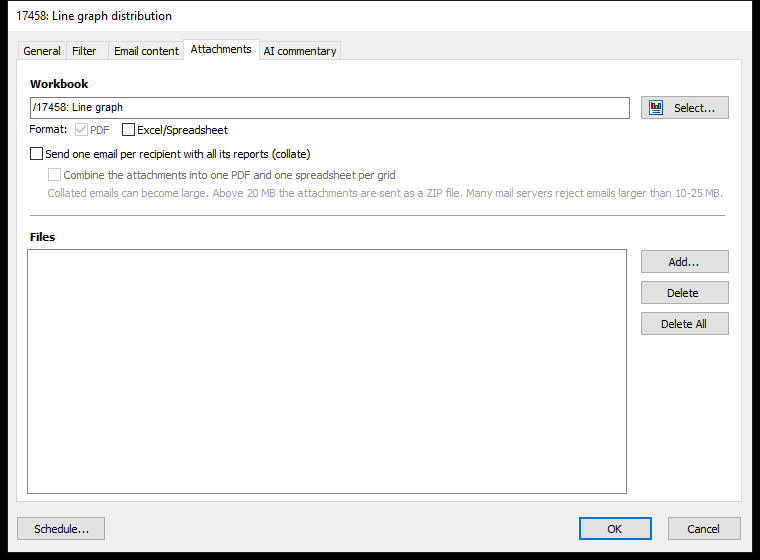
Workbook and Format
| Setting | What it does |
|---|---|
| Workbook | The workbook to send. Click Select... to choose another. |
| Attaches the whole workbook as a printable document – laid out as when you print it | |
| Excel/Spreadsheet | Attaches every table (grid) in the workbook as an Excel spreadsheet |
At least one format must be ticked. Report-style workbooks give the best PDF results – see 7.2 Workbook Types.
The Excel file holds every table on every sheet, whatever the sheet's web settings (build 20128 and later). If the workbook has no tables, the status report says so.
Reports Without Data
New in build 20131.
Tick Don't send reports without data to skip reports that show nothing – e.g. a salesperson without orders this week. A report has no data when none of its tables and charts has data, or they are hidden for lack of data (build 20136 and later).
- Without collate, that report's e-mail isn't sent.
- With collate, the report is left out of the recipient's e-mail. If none of the recipient's reports has data, no e-mail is sent.
Skipped e-mails aren't errors. The status report and Test... show how many reports and e-mails weren't sent for lack of data.
Extra Files
Under Files, Add... attaches other files to every e-mail, e.g. a price list. The files must be reachable from the server that runs Acinta Server. If a file is missing, the e-mail fails with Attached file is not found.
One Email per Recipient (Collate)
When a recipient has several personal reports – e.g. a manager responsible for three regions – they normally get one e-mail per report. Tick Send one email per recipient with all its reports (collate) to send one e-mail with all of them instead (new in build 20069).
Each recipient's e-mail is sent as soon as their reports are done, not after all reports of the run (build 20129 and later).
- The attachments are named after each report's filter value, e.g. Sales - North.pdf, Sales - South.pdf.
- Subject and body use the merge field values of the recipient's first report – watch for the ⚠ icons on the Email content tab.
If some of a recipient's reports can't be made, the e-mail is still sent with the ones that worked, and the status report notes it, e.g. : 1 of 3 reports are missing, because they could not be generated. If none can be made, that recipient gets no e-mail, and it counts as failed with The report could not be generated. If all of a recipient's reports are without data and reports without data aren't sent, no e-mail is sent – that isn't counted as an error.
With collate on, you can also tick Combine the attachments into one PDF and one spreadsheet per grid:
- PDF: the pages of all the reports in one file.
- Excel: one file per table, with one sheet per report, named after the filter value.
Large Emails
Collated e-mails can become large. Above 20 MB, the attachments are sent as a ZIP file, and the e-mail says so. Many mail servers reject e-mails larger than 10–25 MB, so keep an eye on the status report.