3.2 Core Concepts
To use Datashop effectively, you need to understand a handful of core concepts: dimensions, dimensional units, metrics, and facts. These terms describe how your business data is organized and how you interact with it in Datashop. Don't worry—once you grasp these basics, everything else falls into place naturally.
This chapter explains each concept with concrete Business Central examples, so you'll recognize these patterns in your own data.
Dimensions
A dimension is a business perspective or category you use to analyze data. It's a group of related attributes that describe one aspect of your business.
Think of dimensions as the different ways you can "slice" your data: - Customer dimension: Everything related to customers (customer name, group, region, city, credit limit) - Date dimension: Time-based attributes (year, quarter, month, week, day, day of week) - Item dimension: Product information (item number, description, category, unit of measure) - Location dimension: Where transactions occur (warehouse, region, country) - Salesperson dimension: Who handles sales (salesperson name, team, territory)
When you build a visual in Datashop, you're essentially choosing which dimensions to use. A table showing "Turnover by Customer" uses the Customer dimension. A chart showing "Sales by Month" uses the Date dimension. Combining them—"Turnover by Customer and Month"—reveals patterns over time.
Dimension types
Although dimensions generally behave the same in the data model they usually have some fundamental logical purposes outlined below:
- Business Dimensions. Business dimensions categorize logical entities in your organization, such as Person (think Sales person, Employee), Product, Customer, Project, and Supplier.
- Date and Time. Time dimensions are vital for any analytical model and usually goes from the detail of date and up through Week, Month, Quarter and Year. But some organizations also need the time aspect, going down to Hour, Minute and Second, e.g. to analyze time-of-day traffic in shops.
- Geography. A common dimension in dimensional models that allows data to be viewed by Country, City, Region etc.
- Transaction Dimensions. In a dimensional model transactions such as Invoice, Order, and Delivery are common dimensions. See 3.5 Real World Complexity for details about how Datashop handles these special dimensions.
- ERP Dimensions. Many ERP systems allow you to define your own categorizations to extend the ERP system's functionality, often called Dimensions in the ERP system. These ERP dimensions translate directly to individual dimensions in Datashop's dimensional model; But beware the possible confusion of the dimension term here!
- Company Partitions. Many ERP systems allow you to model multiple organizations inside a single ERP system, such as Operations, Holding and subsidiaries. These dimensions are special in the dimension model because they function as a wall between all dimensions, metrics and facts; Data in each Company is unrelated to data in every other Company even if you as a user sees logical relations. See 3.5 Real World Complexity for details.
Dimensional Units
Within each dimension, you'll find dimensional units—specific levels of detail or groupings. A dimensional unit represents one particular aspect of the dimension.
For example, the Customer dimension might contain these dimensional units: - Customer: Individual customer records (the finest detail) - Customer Group: Groupings like "Retail," "Wholesale," "Government" - Customer City: Geographic location - Customer Region: Broader geographic area - Customer Country: Highest geographic level
When you drag "Customer City" into a visual, you're using a dimensional unit from the Customer dimension. This lets you see data at different levels of granularity without changing the fundamental question you're asking.
Parent-Child Relationships
Dimensional units within a dimension often have hierarchical relationships. These parent-child relationships let you drill down from high-level summaries to detailed records: - Country → Region → City → Customer - Item Category → Item Group → Item - Year → Quarter → Month → Day
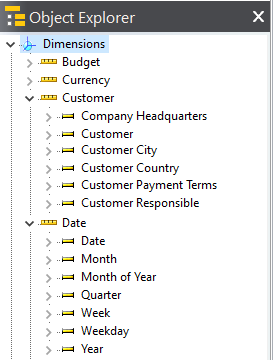
When you see totals for "Germany" in a report, that's the sum of all regions in Germany, which contain all cities, which contain all individual customers. Datashop handles these roll-ups automatically based on the dimensional model's structure.
[!IMPORTANT]
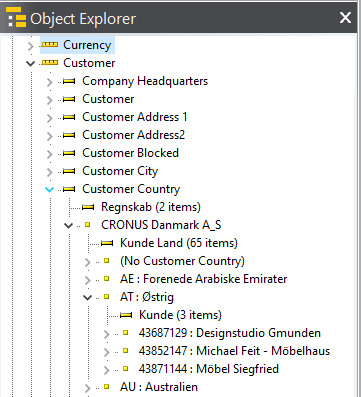
In Datashop's Object Explorer, dimensions appear "flat"—you see a list of dimensional units without the hierarchy visually depicted. However, the relationships still exist and work behind the scenes. When you drill down in a visual, you're navigating these hierarchies even though they're not explicitly shown in the Object Explorer tree. You can experience the hierarchies by expanding nodes in the Object Explorer to see the actual values of dimensions.
Metrics
A metric is a number you want to analyze—something you measure or calculate. Metrics answer "how much?" or "how many?" questions.
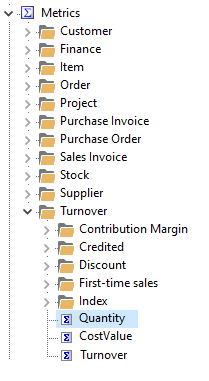
Common metrics in ERP systems (like Business Central) include: - Turnover (or Revenue): Total sales value - Quantity Sold: Number of units - Profit: Revenue minus cost - Profit Margin: Profit as a percentage of revenue - Outstanding Amount: Unpaid invoices - Inventory Value: Current stock value
Metrics are always aggregated—summed, averaged, counted, or calculated across the dimensional units you've selected. When you see "Turnover by Customer," the metric "Turnover" is the sum of all sales for each customer.
[!IMPORTANT]
It's the metrics that bind different dimensions together. For example, what relates an Item to a Customer? It's facts like "Sales Invoice Line" and "Sales Order Line" that establish such relations and the metrics you build on these facts, such as "Sales Order Amount" and "Turnover".
Metrics can also be derived or calculated. For instance, "Profit Margin" might be calculated as Profit / Turnover * 100. These calculated metrics behave just like regular metrics—you can drag them into visuals and analyze them across the dimensions they relate to.
Facts
A fact is the raw data point in your database—typically a single transaction or event. Facts are the building blocks that metrics aggregate.
In Business Central, facts might be: - A line on a sales invoice (one item sold to one customer on a specific date) - A general ledger entry (one financial transaction) - An inventory movement (one product moved from one location to another)
You don't work directly with individual facts in Datashop. Instead, you analyze aggregated metrics built from those facts. When you see "Turnover: $1.2M," that's thousands of individual sales invoice lines summed together.
Facts live in your database's "fact tables"—the transactional tables that record what happened. Dimensions describe who, what, when, and where those facts occurred. The dimensional model connects dimensions to facts so you can analyze transactions from multiple business perspectives—whichever dimensions those facts relate to.
How They Work Together
Here's how dimensions, dimensional units, metrics, and facts combine in a typical analysis:
Question: "What was turnover by customer city last quarter?"
- Metric: Turnover (aggregated from "sales invoice line" facts)
- Dimensional Units:
- Customer > Customer City
-
Date > Date
-
Facts: Individual "sales invoice lines" from the last quarter that provide data to the the analysis
Datashop: 1. Filters facts to the last quarter based on "Date" 2. Groups facts by "Customer city" 3. Sums the turnover for each city (metric aggregation) 4. Displays the result in your chosen visual
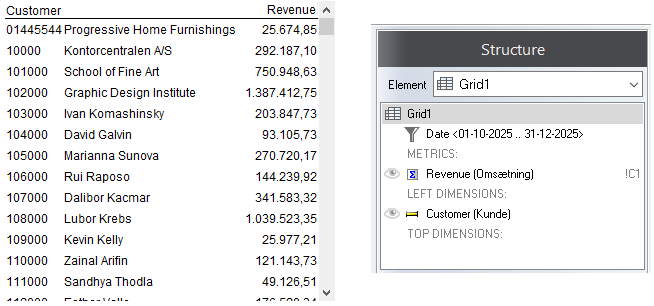
You just dragged three things into a visual. Datashop handled all the complexity.
Business Terms, Not Technical Terms
Notice that we're using business language throughout: Customer, Item, Turnover, Quantity. You're not seeing table names like Sales Invoice Line or field names like Amount Including VAT. The dimensional model translates technical database structures into terms your business uses every day.
This is why dimensional models are so powerful for business users. You don't need to know SQL, understand database schemas, or memorize cryptic field codes. You work with familiar concepts, and Datashop takes care of the rest.
Tips – Core Concepts
- When choosing dimensions for a visual, think about the question you're answering: "By whom? By what? By when? By where?"
- Metrics are always aggregated—Datashop sums, averages, or counts the underlying facts automatically.
- Use drill-through in a visual to escape the dimensional model and see all the underlying transactions/facts from the source system.
Related Topics
- 3.3 How Dimensions Work Together - How metrics bind dimensions through facts
- 3.4 Exploring Your Data Model - Navigating dimensions in practice
- 10.1 Understanding Metrics - Deep dive into metrics
Next Steps
Now that you understand the core concepts, let's explore how dimensions connect to each other: 3.3 How Dimensions Work Together