15.4 Histograms
A histogram groups the values of a number column into intervals, e.g. order sizes into 0–1,000, 1,000–5,000 and 5,000+, and uses the intervals as a dimension. Count orders per interval to see how they're distributed, or use the intervals as rows in any table.
Creating a Histogram
| From | How |
|---|---|
| A table column | Drag a number column from Global Objects → Data Sources onto the rows or columns of a visual → Create histogram → a ready-made set, or Custom... |
| A visual | Right-click a dimension in the Element Structure panel → Histogram → Custom... |
| A workbook | Report Objects → right-click Custom dimensions → New histogram |
To change it, right-click it in the Element Structure panel → Edit histogram....
The Histogram Editor
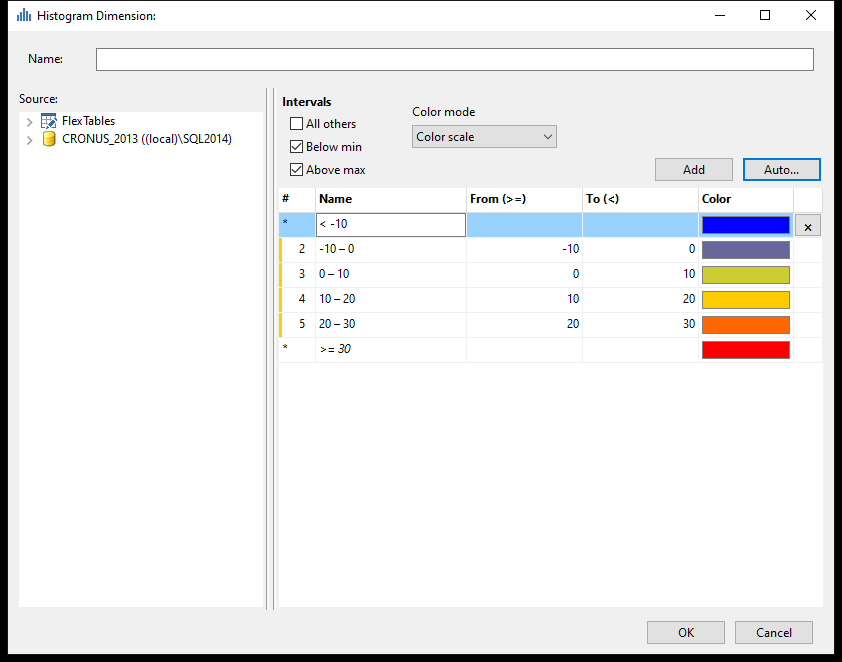 Temperature ranges from the Temperature (°C) preset, with intervals below and above the defined range.
- Give it a Name and pick the number column under Source. Double-click the column to create five even intervals from its smallest to largest value.
- Adjust the intervals: Name, From (>=) and To (<) – each interval includes its From value and goes up to its To value. Add adds an interval after the last one.
- Choose how values outside the intervals are handled:
- Below min – an interval for values below the first From;
- Above max – an interval for values above the last To (on by default);
- All others – one interval for everything outside.
- Choose a Color mode: Color scale (a gradient over the intervals), Manual (pick each Color) or No colors.
The editor marks intervals that overlap, leave a gap or have From greater than To.
Even Intervals and Presets
Auto... → Custom... creates even intervals: enter Min:, Max: and the number of Intervals: (or the Step size:), or click Read from data to use the column's actual values.
Ready-made sets under Auto...: Compass (4, 8 or 16 sections, for wind directions in degrees), Beaufort scale (knots), Douglas sea scale (m), Temperature (°C) and (°F), Percentage quartiles and Time of day (night, morning, afternoon, evening).
Intervals with the same name count as one – the compass presets use this for N, which covers both 315–360° and 0–45°.
Tips – Histograms
- Choose interval limits that mean something to readers – round numbers, or limits from your business such as discount levels.
- Use Above max so very large values aren't lost.
Common Issues – Histograms
Problem: Values are missing. - Solution: They fall outside the intervals. Tick Below min and Above max, or All others.
Problem: I can't see the start, middle and end colors of the color scale. - Solution: Switch Color mode to another mode and back to Color scale.